ETHENOTETHAN / PORTAL

Portal

Open source · MIT · Swift 6 · macOS 14 + iOS 17

The agent you run
somewhere else,
on a Mac that feels
like it lives here.

Portal is the native macOS and iOS client for Harness, an opinionated fork of Hermes Agent. Harness adds the WebSocket JSON-RPC gateway and the agent-side machinery a rich client needs; Portal is the surface built for it — no local server, no CLI, no Electron. What arrives over that socket is not just text: tool calls, reasoning traces, subagent spawns, artifacts, cron dataflow and approvals all get a real surface built for them. (It also speaks Centaur, over REST + SSE, for the reduced surface that backend allows.)

THE SHORT VERSION

One socket, many lenses

Native, not wrapped

SwiftUI throughout, Swift 6 strict concurrency, and Apple frameworks for everything load-bearing: URLSessionWebSocketTask for the transport, SecItem for credentials. There is no third-party networking library in the app.

Built for Harness

Harness is a fork of Hermes Agent whose every change exists to serve this client: the /v1/ws gateway, a wiki API with an edit history, a cron dataflow graph, living artifacts, learning, a file browser. The full set is published as a fork diff that Harness's CI keeps current. Centaur (REST + SSE) and Hermes Standard (management HTTP) are also supported; each declares its capabilities, so the UI only offers what the connected backend can honour.

The turn is the unit

A single prompt fans out into tool calls, reasoning beats and spawned subagents. Portal keeps that structure instead of flattening it to prose — which is what makes the timeline, the graph and the token rollups possible.

FEATURE SET

Ten surfaces

Every image below is a real render of the shipping SwiftUI view, captured from the app's own code with sample data — not a mockup. Surfaces that can only be captured against a live gateway are described in prose rather than staged.

01 — CHAT

Streaming conversation with the structure kept intact

Responses stream in as markdown with syntax-highlighted code, Mermaid diagrams, LaTeX, tables and file attachments. Reasoning traces arrive as a collapsible section rather than being interleaved into the answer, so the transcript stays readable while the thinking stays available.

Deltas arrive fast enough to cause layout storms, so events are batched on a ~32 ms window before they reach the view — the transcript keeps up with a firehose without dropping frames.

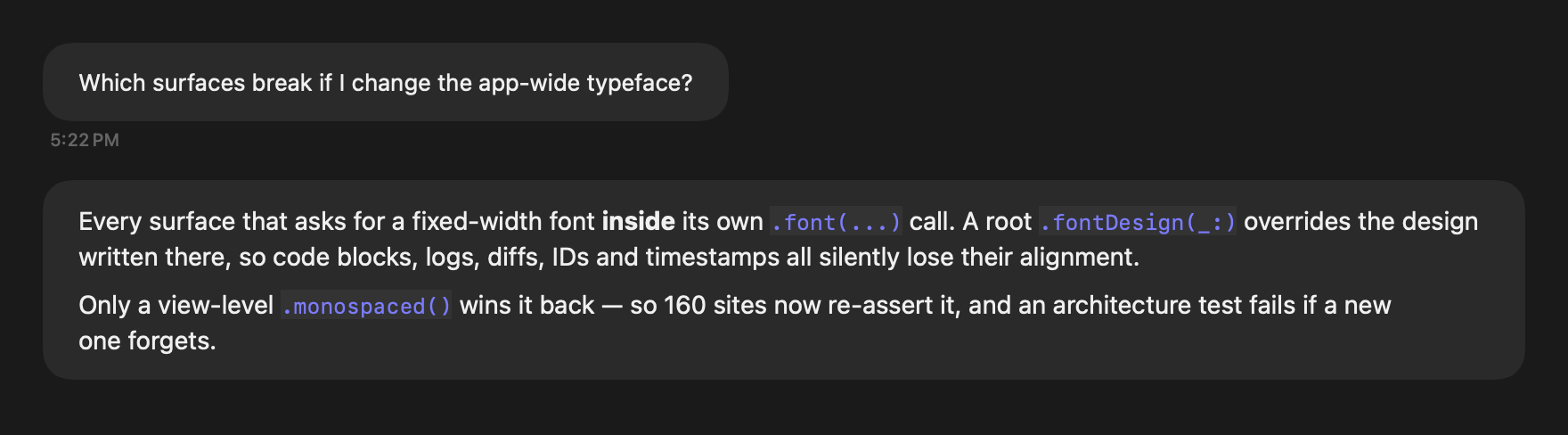
A Portal chat transcript: a user question in a rounded bubble above a full-width assistant response with inline code spans.

02 — TOOL TRACE

Tool calls are their own surface, not chat chrome

The default transcript is just the conversation. The tool trace — what ran, against what, for how long — is an opt-in canvas panel, so a fifty-call turn doesn't bury the answer it produced.

Each pill carries the tool name, its target, a result summary and elapsed time. Durations and identifiers stay monospaced no matter which app typeface you pick, because columns that jitter are columns you can't scan.

Three completed tool-call pills: read_file, grep and edit_file, each with a green check, a result summary and an elapsed time.

03 — THOUGHT GRAPH

The shape of a turn, filling in as it happens

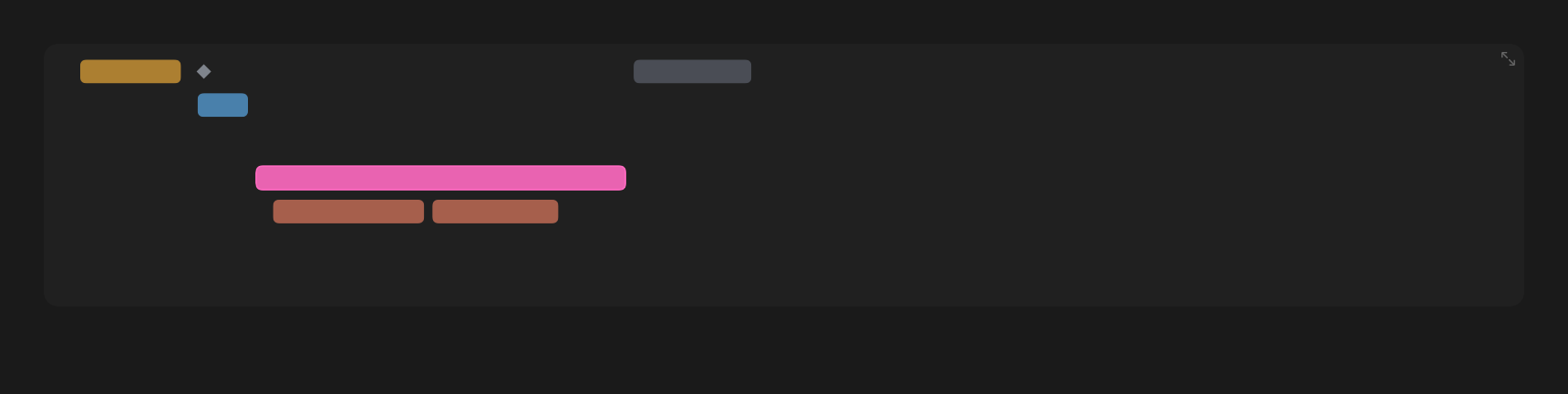
The turn is drawn as a flamechart: horizontal position is when a step started, bar width is how long it took, and every actor — the main loop plus each spawned subagent — owns its own lane. A compact strip sits inline in the chat; tapping it opens the full plot with the time ruler, reasoning gists and a per-node inspector.

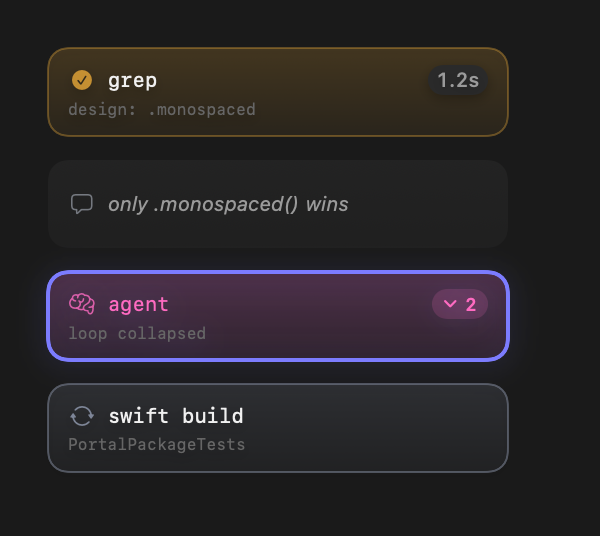
Reasoning beats are durationless diamonds. Subagent lanes collapse to a step count. An on-device MLX model summarizes long reasoning streams into the gists the graph labels itself with.

The inline turn timeline: colored bars on stacked lanes, a reasoning diamond, and a subagent lane holding two nested edit bars. Four thought-graph node cards: a completed grep with a 1.2s chip, a reasoning beat, a selected collapsed agent showing 2 hidden steps, and a running swift build.

04 — CANVAS

Panels you arrange, not a layout you accept

The conversation is one resizable panel on a free-form canvas. Any message can be peeled into a floating card, and roughly two dozen lenses dock beside it — flamechart, thinking beats, running tools, the skills taxonomy for the turn, the files it touched, session artifacts, delegation batches, cron activity, sessions timeline.

Panel kinds are registrable at runtime rather than a closed enum, so a saved layout referencing a lens this build doesn't know still loads — it renders a placeholder instead of crashing.

05 — THE WIKI

A knowledge base the agent keeps, with its sources shown

Not a document viewer. Pull requests, tickets, documents, Slack directives and usage rollups are ingested as raw events, and agents turn them into typed, wikilinked pages. The wiki's home is the force graph itself — a 2D canvas by default, SceneKit in 3D as a toggle — with a folder sidebar, a changeset drawer showing git-style inline diffs, and a reader that docks over the still-live graph. You can pin pages to compare them side by side.

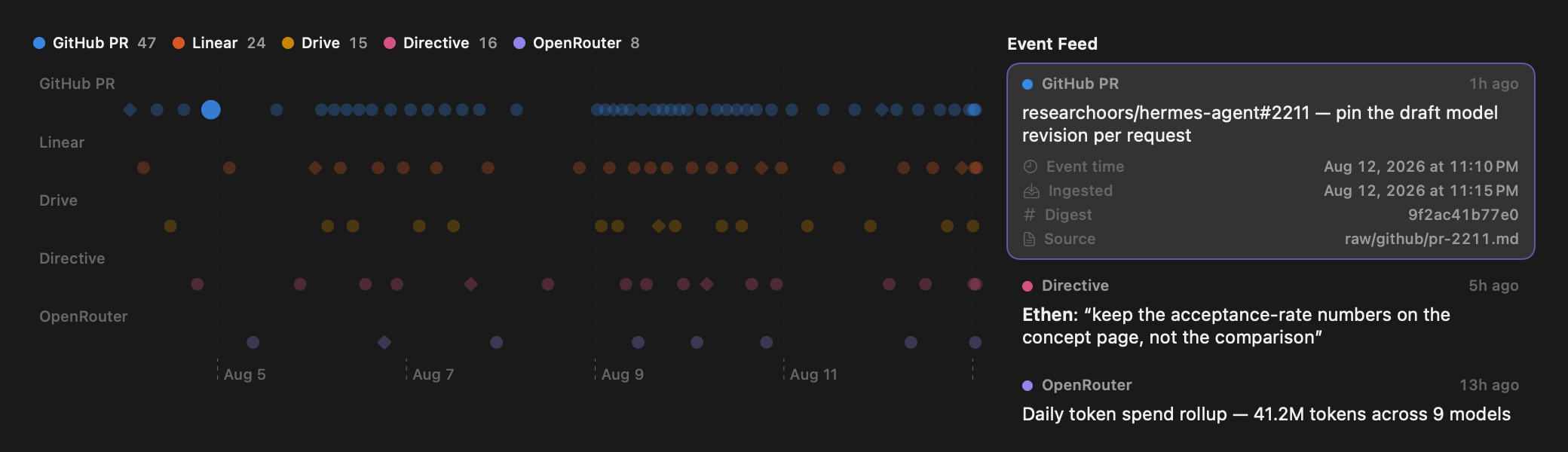
The events page is where a vault stops being a folder of markdown and starts being auditable. Every ingested source lands on one event-time axis in a lane per kind, and plot and feed share a single selection — click a dot, its row expands. A hollow diamond means the pipeline only knew ingest time. A digest on the row is how you tell a re-ingest from a genuinely new version. Where a backend records it, an event carries the changesets it caused, so provenance walks event → changeset → page without a second round trip.

The wiki's ingestion events page: a legend with per-kind counts above a five-lane dot plot over ten days, beside an event feed whose selected GitHub PR row is expanded to show event time, ingested time, digest and source path.
One selection plane across both panes — the enlarged dot and the expanded row are the same event. Hollow diamonds are events with an estimated time.

06 — ACTIVITY INBOX

The things that need you, in one place

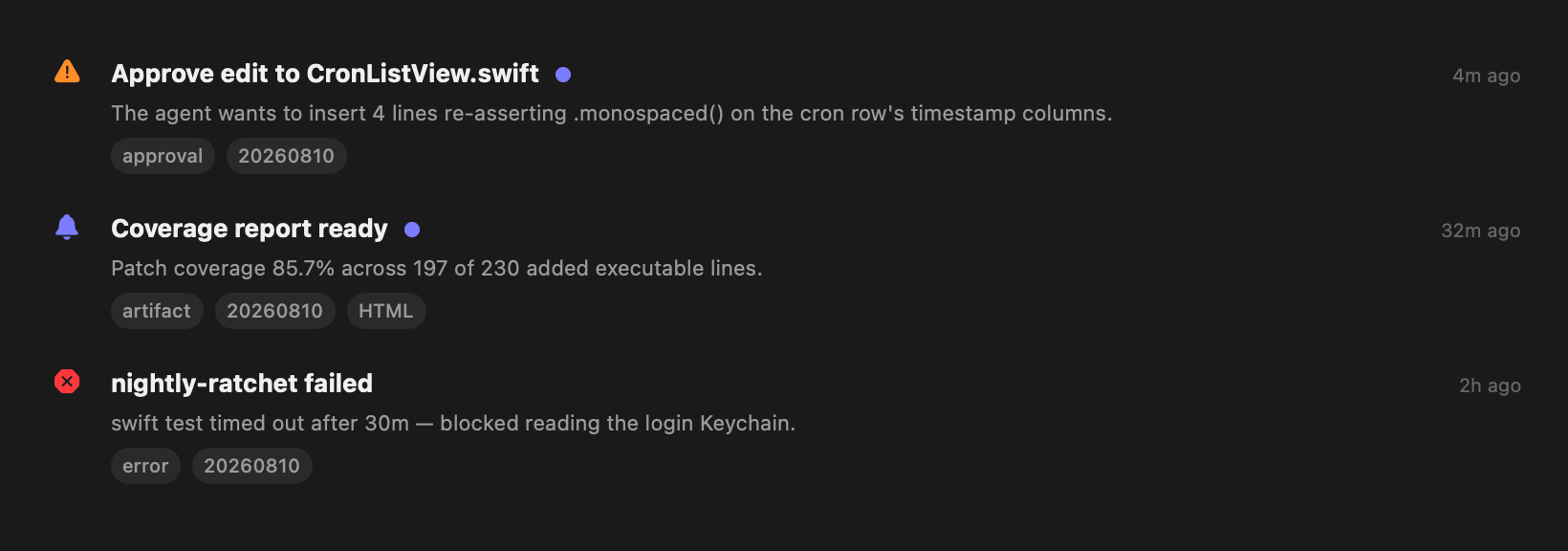
Tool approvals, clarification requests, artifact drops and failures land in a severity-sorted inbox with session pills and artifact previews. Approvals matter most: the gateway resolves an unanswered request as a denial after a timeout, so a request you never saw is a silently killed command.

Because parallel subagents can each block at once, the approval banner reads a queue rather than a single slot — the head is answerable and the rest stay visible behind a disclosure. Approve is a split control: the primary tap is the narrow "once", broader scopes are a deliberate second gesture.

Three activity inbox rows: a warning-severity approval request, an info-severity coverage artifact with an HTML pill, and a read error row for a failed cron job.

07 — SKILLS & CRON

Schedule the agent, then watch what it did

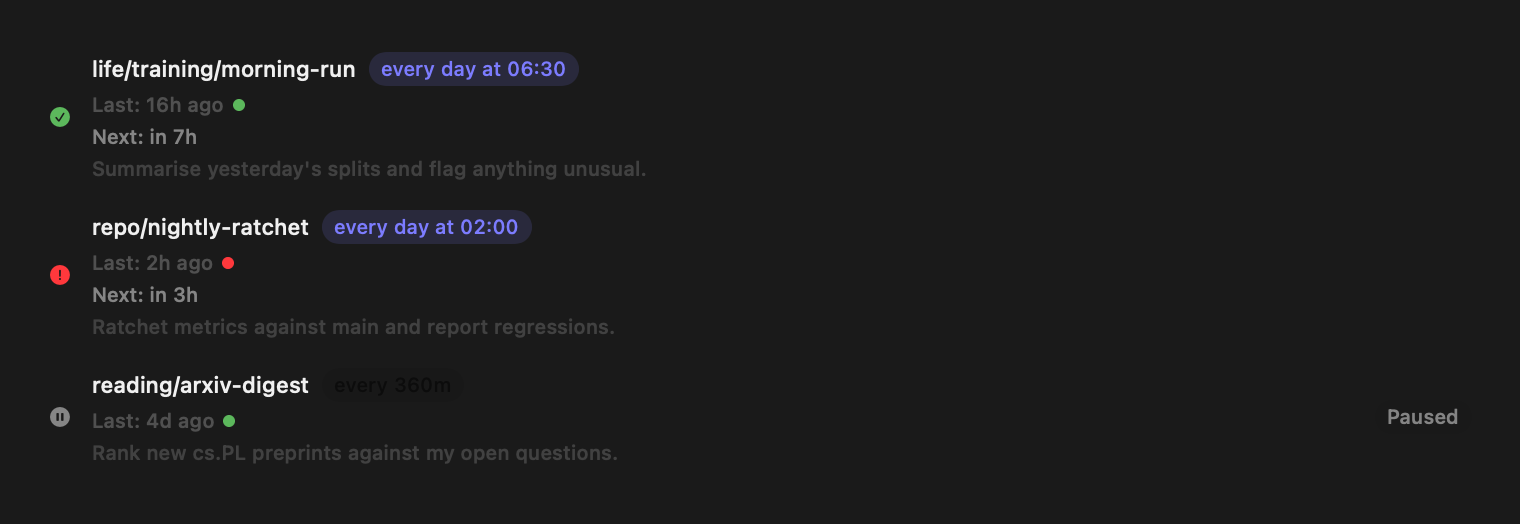
Browse, edit and schedule agent skills; group cron jobs into categories; and inspect run history as an activity canvas — volume over time, per-job OK/error breakdown, a lane-per-job scatter of activations, and the session each activation opened.

Sessions get the same treatment through Mission Control: a spawn tree, a live observer, a playback timeline, prompt breakdowns and token usage — all as panels on a canvas you arrange.

Three cron job rows: a healthy daily run, a failed nightly ratchet with a red status dot, and a paused digest job.
Category paths, schedule badges, last/next run and a one-line prompt preview — the failed job carries the error through to the row.

08 — LIVING ARTIFACTS

Ask for a 3D world, then act inside it

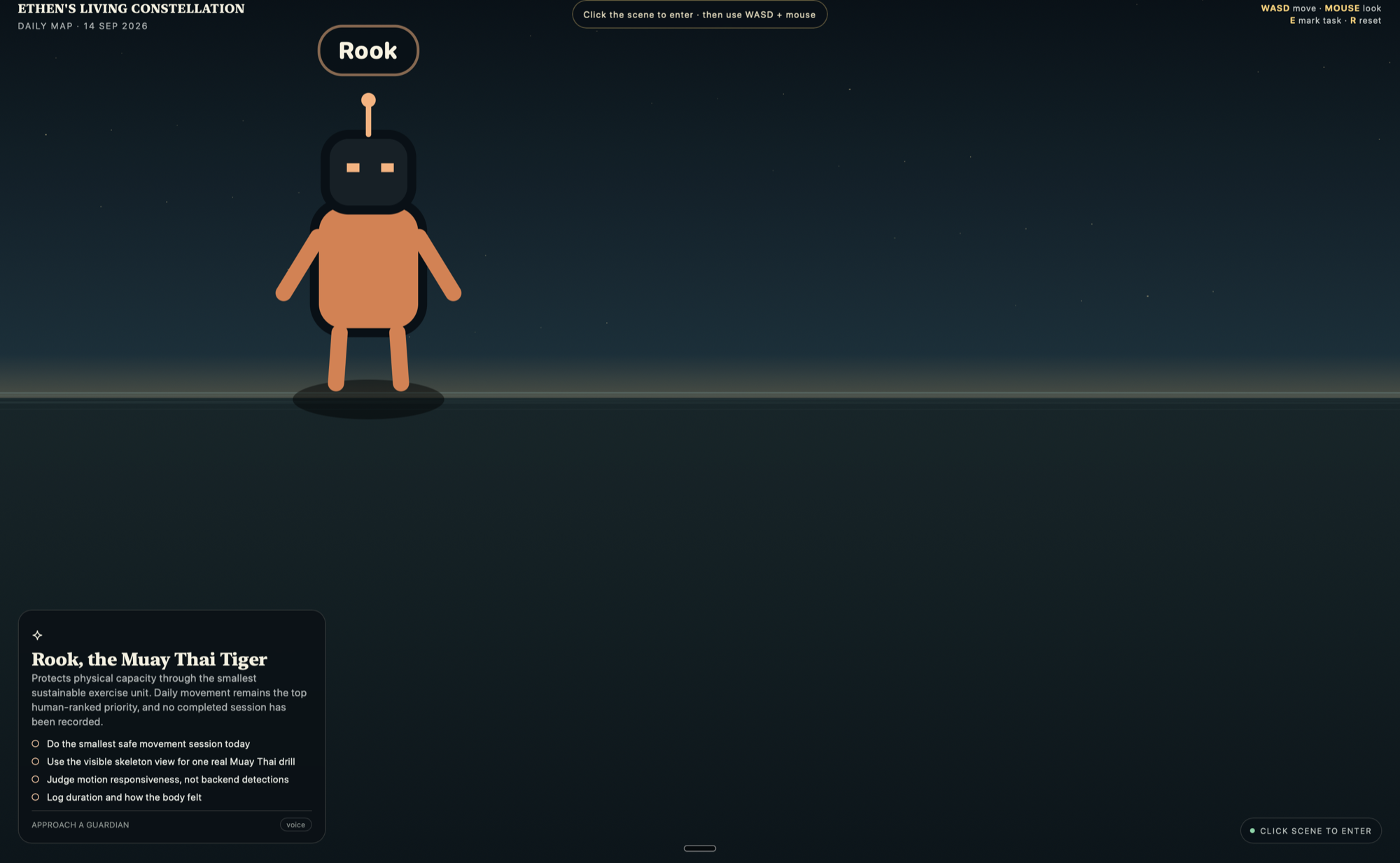
An artifact is a named object the agent keeps across turns and sessions, not a rendered message — it accumulates revisions instead of being replaced. Ask for a walkable 3D world and you get one, hosted in a real window with the mouse captured through Pointer Lock.

The part that matters is that the world is not a picture. Objects in it can carry declared intents, so aiming the crosshair at something and clicking dispatches a real backend action — including kicking off a contained agent session you can then click straight into. The same contract puts buttons on a dataset row.

Artifacts never carry executable authority. They declare intents as data; the page markup is inert attributes with no script, fetch or credential, and the host injects the only bridge that exists behind a per-view nonce. The gateway re-resolves every click against the pinned revision, and confirmation for anything destructive is native chrome led by the server's own name for the action — not the artifact's label.

Sessions author and revise; crons maintain. An artifact declares which jobs tend it, so the app can tell you "a job refreshes this every six hours" rather than leaving you to guess whether something written once is still true.

A generated 3D world artifact, Ethen's Living Constellation: a robot guardian named Rook stands on a horizon under a starfield, a card at lower left describes Rook, the Muay Thai Tiger, with four checklist tasks, and a WASD and mouse control hint sits top right with a Click scene to enter prompt.
A real generated world running against a live gateway — a daily map whose guardians are objects with declared intents. Click the scene to capture the mouse, walk up to a guardian with WASD, and pressing E marks a task through the backend rather than in the page.

09 — LEARNING

Turn a session into something you retain

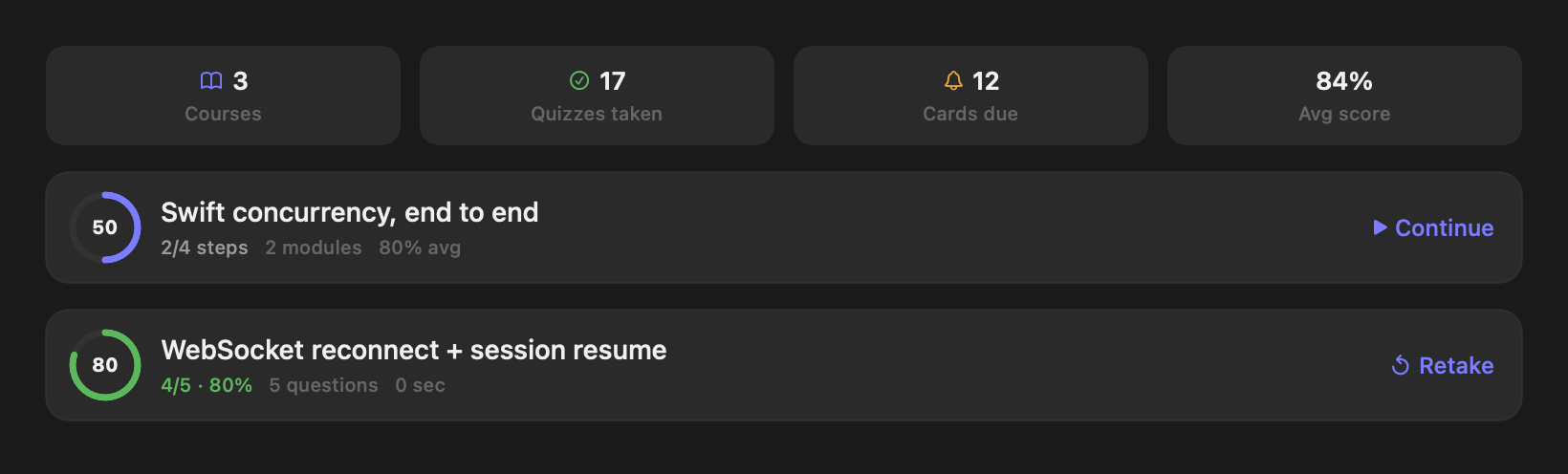
Any conversation can become a structured course: ordered modules of lessons and quizzes, with per-step progress so "where was I" is answerable at every level. Flashcard decks use SM-2 spaced repetition and surface what's due.

Course content is stored inline rather than referenced by id — an agent-authored curriculum is its content, which also makes dangling references to a single historical quiz attempt impossible.

The Learning dashboard: four stat tiles, a course card at 50% with 2 of 4 steps done, and a completed quiz card scored 4 out of 5.

10 — APPEARANCE

Themes that reach every call site

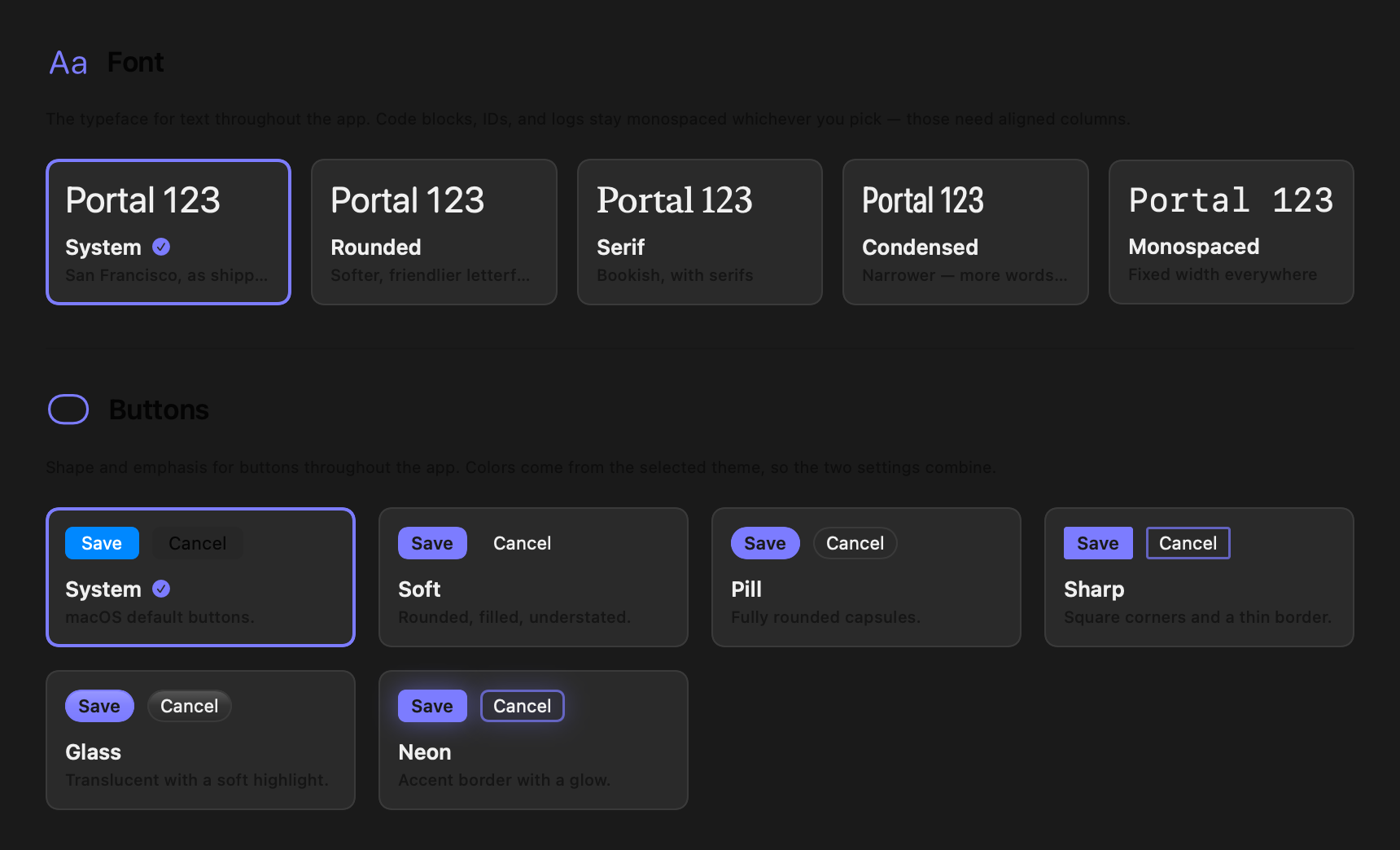
Palette, button shape, toolbar icon treatment and app typeface are all one pane. Themes apply collectively, and every individual toolbar button can still be overridden on its own — shape and colour independently, each clearable back to the theme.

One root modifier reaches roughly 1,700 text call sites. The catch found while building it: a root .fontDesign silently overrides a design: written inside a site's own .font(...), so every monospaced surface had to re-assert itself at the view level. A test now enforces that, with a documented allowlist for the surfaces defended by an ancestor instead.

Portal's Appearance settings: a Font section with five typeface cards and a Buttons section with six button-style cards including glass and neon.
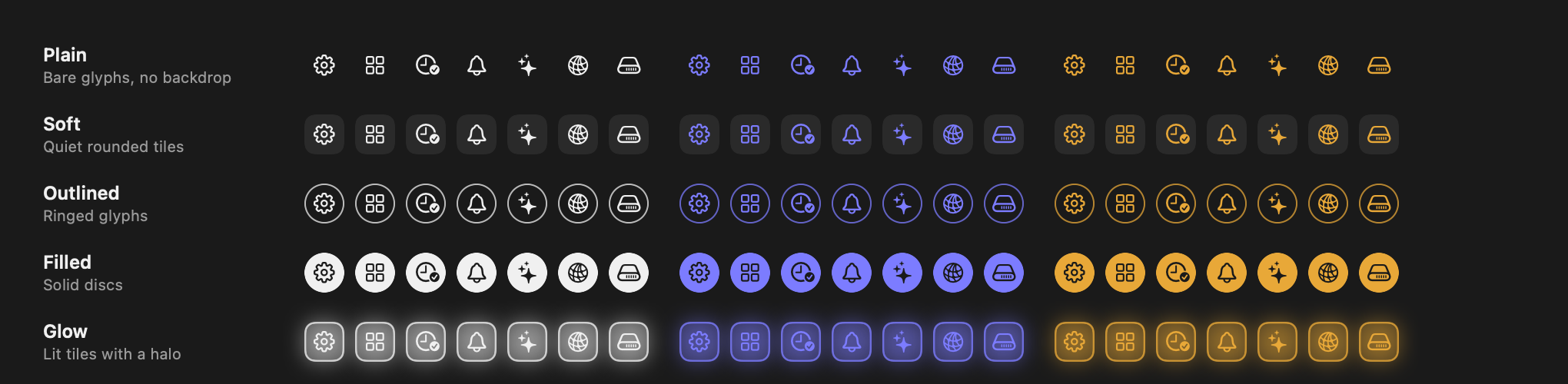
A grid of Portal toolbar icons: five treatments — plain, soft, outlined, filled, glow — each shown in neutral, accent and warning tints.
Five toolbar treatments across three tints. Every entry is themable collectively or overridden one button at a time.
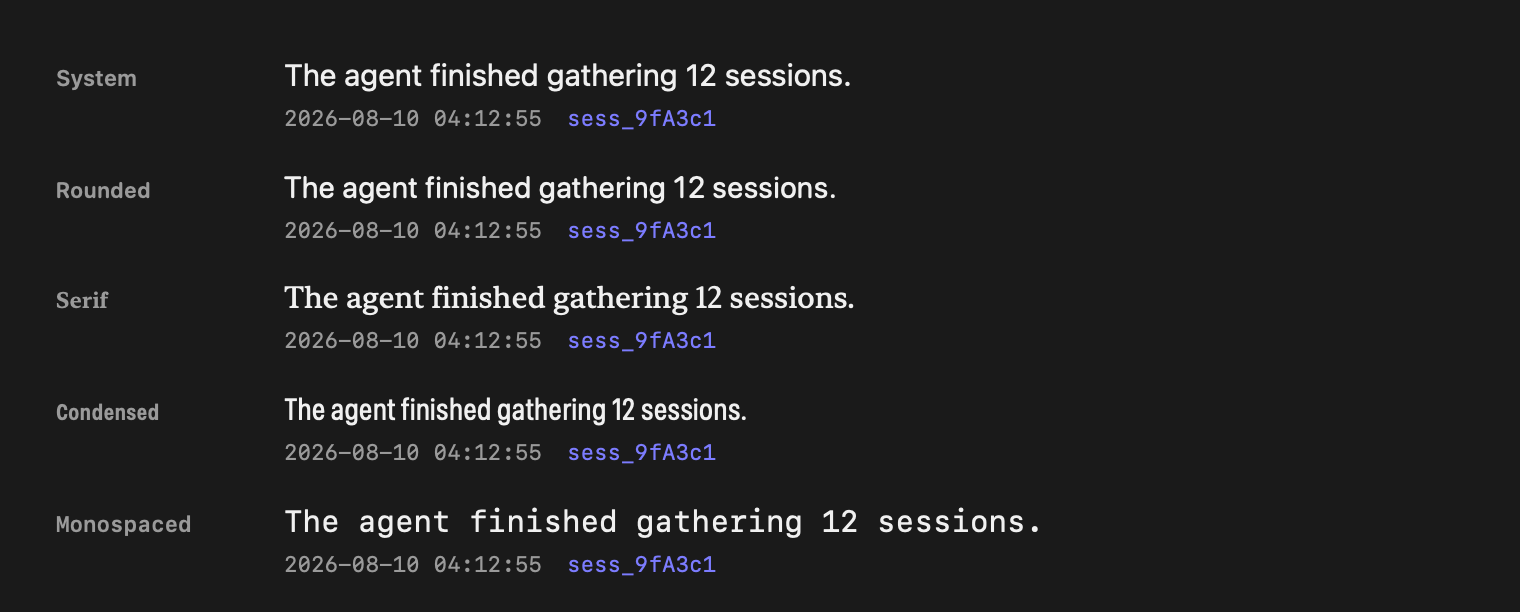
The same sentence and a monospaced timestamp rendered in all five Portal typefaces: system, rounded, serif, condensed and monospaced.
All five app typefaces. Timestamps and session IDs hold their monospaced columns in each — an architecture test fails the build if a new site forgets to re-assert it.

ARCHITECTURE

How it's put together

Five layers, twenty-one components, one strict dependency direction: Models → Services → ViewModels → Views. The interactive, source-backed model lives in the Architecture Observatory.

Experience6 components · 134 files

SwiftUI surfaces — app shell, chat, operations, wiki, artifacts, thought graph.

Orchestration3 components · 19 files

@MainActor observable objects holding chat, operations and wiki state.

Integration5 components · 52 files

The backend contract, Hermes and Centaur clients, the artifact-intent seam, and device-local services.

Foundation3 components · 113 files

Value types, codable wire models, shared UI primitives and utilities.

External systems4 runtime boundaries

The Harness gateway, Hermes Standard, the Centaur API, and OS device services.

Harness — ethenotethan/harness, the opinionated Hermes Agent fork

Portal is the client half of Harness. The gateway is ethenotethan/harness, a fork of NousResearch/hermes-agent that is rebased onto upstream periodically and documents everything it changes on a fork-diff page its CI refuses to let go stale. The fork is what matters: stock hermes-agent has no /v1/ws. Upstream exposes only an OpenAI-compatible HTTP API, so the WebSocket JSON-RPC endpoint — and with it the wiki, cron-graph, artifact, learning, file-browser, feed and push-notification RPCs this app is built on — exists only in Harness. Point Portal at a stock install and the health probe passes while the socket upgrade fails.

Everything served over that one endpoint: session lifecycle, prompt.submit, interactive approvals and clarifications, subagent events, model catalog and switching, session timeline and usage introspection, and voice.

The gateway advertises its own surface at /v1/capabilities, so a feature the running gateway doesn't have stays hidden rather than failing on use — and that endpoint 404ing is the quickest way to tell you're on stock upstream. docs/gateway-setup.md walks through bootstrapping one, including the trap that hermes update pulls upstream and removes /v1/ws.

Centaur — a sandboxed harness

Centaur is a different shape of backend, not a second Hermes: REST for control, SSE for the stream, no WebSocket. Five endpoints under /api/session/{thread_key} — create, append the user turn, execute, interrupt, and an event stream that replays from ?after_event_id=N.

Its wire events are sparse — harness stdout plus execution lifecycle — so CentaurEventAdapter normalizes them into the same GatewayEvent enum the gateway emits, and the chat view model renders a Centaur session unchanged. Because there is no transcript-fetch endpoint, the persisted SSE cursor is the only "where was I" marker; it survives launches so a resume doesn't replay the transcript from zero.

The asymmetry is declared rather than discovered. Centaur runs non-interactively in a sandbox, so approvals, subagent events, skills, attachments, model switching, response styles and voice are all off, and the gateway services — cron, activity inbox, feed, learning — never apply. It gains what Hermes lacks: workflow schedules and run history under /api/workflows/*, and wiki reads over a public REST wiki API instead of wiki.* RPCs. It also carries a fixed identity, since a harness is a different agent platform and not a Hermes persona.
One socket, multiplexed

A single persistent WebSocket per app process. Sessions are multiplexed over it by session_id, so creating or switching a session never recreates the transport. Events fan out through Combine; connections are deduped on a signature of URL, API key and Cloudflare cookie, so redundant reconnects are skipped while a genuine gateway switch rebuilds everything and resets in-memory state.

Two session identities

The short hex session_id addresses the current connection; the database-format session_key (e.g. 20260810_041255_d91274) is what survives a reconnect. Keepalive pings run every 15 s, reconnect backs off 1→2→4→…→30 s for up to ten attempts, and resume goes through the session key.

Connection lifecycle — Hermes gateway

  1. HTTP health probe against /health, 5 s timeout.
  2. If a Cloudflare Access cookie is held, verify it — a redirect or 401 clears it and fails closed.
  3. Open the WebSocket to /v1/ws with Authorization: Bearer.
  4. Gateway announces itself with gateway.ready.
  5. session.create returns both id formats.
  6. prompt.submit, and the event stream begins.
  7. Message, tool, reasoning and subagent events stream in.
  8. Interrupts and approval responses go back up the same socket.
  9. Ping/pong every 15 s; on drop, backoff and retry.
  10. Resume through session_key.

Centaur has no transport to establish — REST is usable the moment the client exists, so it reports connected until a request or stream actually fails, and its reconnect is the replayable SSE cursor rather than steps 1–4.

Quality is a ratchet, not a wish

SwiftLint runs --strict against a frozen baseline, so existing debt is allowed to shrink and never grow. Four metrics are ratcheted against the base branch: compiler warnings per category, testable-layer coverage with 80% required on lines a change adds, skipped-test count, and Periphery's dead-declaration total. Custom rules enforce the layer direction, ban new singletons, keep SwiftUI out of Services, and require explicit access control.

Apple frameworks where it counts

URLSessionWebSocketTask over Starscream or NIO: zero networking dependencies, native backpressure, and it inherits URLSession's proxy, TLS and cookie handling — which is what makes Cloudflare Access work at all. The third-party packages are for presentation and on-device inference: Highlightr, a Mermaid renderer, and MLX with swift-transformers.

GET STARTED

Build it

Requirements

  • macOS 14 (Sonoma) or iOS 17+
  • Xcode 16+ / Swift 6.1+
  • brew install xcodegen
  • A running backend: an ethenotethan/harness gateway (the fork — stock hermes-agent has no /v1/ws) or a Centaur control plane

Clone and run

git clone https://github.com/ethenotethan/portal.git
cd portal

swift build     # SwiftPM library build
make build      # full macOS app
make run        # build and launch

make build regenerates the Xcode project from project.yml first — building a stale .xcodeproj silently misses new files. On first launch, enter your gateway URL and API key; Portal converts https:// to wss:// and appends /v1/ws for Hermes gateways itself.